Regex Backtracking and ReDoS: Why Your Pattern Hangs and How to Fix It
RegEx Tester & Group Matcher
Toggle the g, i, m, s, and u flags live, inspect every capture group, and read a token-by-token explanation of what your pattern actually does.
1. Concrete Visual Walkthrough: Deconstructing Patterns & ReDoS in Toolbox
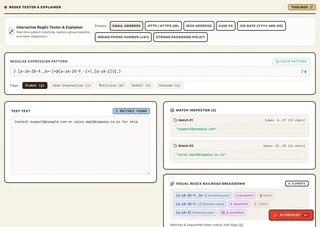
🎯 When Does This Tool Come in Handy? (Key Use Cases)
- Use Case 1: Pre-Flight ReDoS Pattern Audits: Before deploying validation regexes to Node.js or Python API gateways, paste your pattern into Toolbox to inspect nested repetition and token breakdowns.
- Use Case 2: Visualizing Nested Capture Groups: Debug complex regex extractions (like email headers, URLs, or log formats) with instant visual highlight boxes and named capture group indexes.
- Use Case 3: Live Flag Testing Without Browser Restarts: Test behavior across
g(global),i(case-insensitive),m(multiline),s(dotAll), andu(unicode) flags with automaticlastIndexstate resets. - Use Case 4: Zero-Telemetry Sensitive Log Parsing: Test regexes against sensitive production logs containing customer PII or API tokens with 100% certainty that zero bytes leave your browser RAM.
The Exponential Backtracking Bomb
To see how an innocent-looking 8-character regular expression can freeze a high-performance CPU, let’s trace the canonical nested quantifier pattern:
$$\text{Pattern: } \text{/^(a+)+$/}$$When tested against valid input like "aaaa", the inner a+ consumes all four characters on the very first greedy pass, the outer + finishes, and the match succeeds in 0.02 milliseconds.
Now, look at what happens when the input ends with a single non-matching character:
$$\text{Input: } \text{"aaaaaaaaaaaaaaaaaaaaaaaaaaaa!" (28 characters)}$$1. Inner a+ greedily consumes 28 'a' characters.
2. Engine checks for '$' (End of String). Next character is '!'. MISMATCH!
3. Backtrack Step 1: Inner a+ takes 27, outer group takes 1. Check '$'. Fail.
4. Backtrack Step 2: Inner a+ takes 26, outer group takes 2. Check '$'. Fail.
5. Backtrack Step 3: Inner a+ takes 26, outer group takes 1 + 1. Check '$'. Fail.
...
Exploration Space: The engine must test every possible ordered integer partition of 28 items!
🔴 The Combinatorial Step Explosion
| Input String Length | Partitions Explored | V8 Engine Execution Time | Impact on Node.js Event Loop |
|---|---|---|---|
| 15 characters | ~16,384 | 0.002 seconds | Micro-stutter (< 2ms) |
| 20 characters | ~524,288 | 0.045 seconds | Visible frame drop |
| 25 characters | ~16,777,216 | 1.42 seconds | HTTP gateway timeout warning |
| 30 characters | ~536,870,912 | 48.2 seconds | Complete Node.js Event Loop Freeze |
| 35 characters | ~17,179,869,184 | ~26.4 minutes | Kubernetes pod killed (Liveness Failure) |
| 40 characters | ~549,755,813,888 | ~14.1 hours | Permanent process lockup |
Because each additional character doubles the computational workload, moving from 25 to 30 characters increases execution time from 1.4 seconds to nearly a minute on a modern 3.5 GHz CPU core.
2. One-Sentence Summary: What ReDoS Actually Is
Regular Expression Denial of Service (ReDoS) is an algorithmic complexity attack where an attacker submits a specially crafted input string to a backtracking regex engine (like V8 in Node.js or Chrome), triggering an exponential state search that exhausts 100% of CPU capacity and starves the application event loop.
3. Technical Breakdown: NFA Backtracking vs Linear DFA Engines
Not all regex engines behave the same way under load. The performance model depends entirely on whether the engine uses a Non-deterministic Finite Automaton (NFA) or a Deterministic Finite Automaton (DFA).
Architectural Comparison: NFA vs DFA
| Engine Architecture | Engines & Languages | Worst-Case Time | Backreferences & Lookaround | Vulnerable to ReDoS? |
|---|---|---|---|---|
| Backtracking NFA | JavaScript (V8), Python (re), Java, Ruby, PCRE, .NET | $\mathcal{O}(2^n)$ Exponential | Supported | YES (High Risk) |
| Automaton (DFA / RE2) | Go (regexp), Rust (regex), Google RE2, grep -E | $\mathcal{O}(n)$ Strictly Linear | Not Supported | NO (Mathematically Immune) |
Why JavaScript Uses Backtracking NFAs
JavaScript, Python, and Java chose backtracking NFAs because NFAs support advanced grammar features:
- Lookahead and Lookbehind assertions:
(?<=foo)bar(?=baz) - Backreferences:
([a-z]+)-\1(matching identical repeated words)
However, this flexibility comes with a severe architectural tradeoff: the lack of a guaranteed polynomial time bound. When a backtracking engine encounters ambiguity, it creates a state branch. When a branch fails, it rewinds execution state and explores the next branch.
4. Verifiable Security Evidence: Three Real-World Outage Post-Mortems
Catastrophic backtracking is not a theoretical academic quirk; it has knocked down some of the largest internet infrastructure providers in history:
1. The Cloudflare Global Outage (2 July 2019)
- The Incident: Cloudflare experienced a global outage dropping traffic across all services for 27 minutes.
- The Culprit: A newly deployed Web Application Firewall (WAF) rule designed to detect cross-site scripting:
.*(?:.*=.*) - The Mechanics: The combination of unanchored greedy dot-stars (
.*) competing for the same character positions caused CPU utilization to hit 100% across Cloudflare’s worldwide edge routing fleet, exhausting resources before HTTP requests could reach proxy workers.
2. The Stack Overflow Outage (20 July 2016)
- The Incident: Stack Overflow went completely offline for 34 minutes.
- The Culprit: An unanchored regular expression used to strip leading and trailing whitespace from user-submitted code blocks:
^[\s\u200c]+|[\s\u200c]+$ - The Mechanics: A user submitted a line containing 20,000 consecutive whitespace characters without a trailing newline. The engine explored nested permutations of Unicode zero-width non-joiners (
\u200c), locking the web tier.
3. CVE-2021-37701: The Node.js trim-newlines Advisory
- The Incident: The widely used npm package
trim-newlineswas vulnerable to ReDoS via/^[^\S\r\n]+|[^\S\r\n]+$/g. Passing a string with thousands of spaces without a newline caused single-threaded Node.js microservices to freeze indefinitely.
5. The Three Catastrophic Regex Shapes (And Their Linear Rewrites)
Almost every real-world ReDoS vulnerability reduces to one of three classic structural anti-patterns:
Shape 1: Nested Quantifiers
Ambiguity is the engine of catastrophic backtracking. When an outer quantifier wraps an inner quantifier, both compete for the same characters:
// ❌ VULNERABLE: Exponential O(2^n)
const bad1 = /^(a+)+$/;
const bad2 = /^(\d+)*$/;
const bad3 = /^([a-zA-Z0-9]+_?)+$/;

// ✅ REWRITE: Collapsed into a single linear pass O(n)
const good1 = /^a+$/;
const good2 = /^\d*$/;
const good3 = /^[a-zA-Z0-9]+(_[a-zA-Z0-9]+)*$/;
Shape 2: Overlapping Alternations Under Repetition
If two branches in an alternation can match the same substring, the engine has multiple valid pathways to explore at every step:
// ❌ VULNERABLE: Overlapping branches (a and aa both match 'a')
const bad = /^(a|aa)+$/;
const badSpace = /^(\s|\t|\n)+$/; // \s already includes \t and \n!

// ✅ REWRITE: Mutually exclusive character sets
const good = /^a+$/;
const goodSpace = /^\s+$/;
Shape 3: Greedy Dot-Star Crossing Delimiters
Using .* next to a delimiter causes the dot to consume the entire string, including the delimiter, before backtracking character by character:
// ❌ VULNERABLE: Greedy dot-star backtracks across commas
const badCsv = /^([^,]*),(.*),(.*)$/;
const badHtml = /<div>(.*)<\/div>/;

// ✅ REWRITE: Negated character classes (Cannot cross the delimiter!)
const goodCsv = /^([^,]*),([^,]*),([^,]*)$/;
const goodHtml = /<div>([^<]*)<\/div>/;
6. Actionable Getting Started Checklist: Auditing Your Codebase
Follow this 5-point ReDoS audit protocol before deploying regular expressions to production:
- Eliminate Nested Repetition: Inspect all groups with
+or*. Ensure no inner tokens also contain+,*, or{n,m}quantifiers. - Replace
.*with Negated Sets: Whenever parsing delimited fields (quotes, commas, brackets, tags), replace.*with[^"'\n,>]*. - Enforce Maximum Input Length: Never evaluate a regex against unbounded strings. Cap user inputs at a reasonable boundary (e.g.
input.slice(0, 512)). - Beware the
lastIndexGlobal Bug: If a RegExp uses the/gflag, it retains state across invocations. Resetre.lastIndex = 0or use non-global expressions for validation. - Fuzz Near-Failure Cases: Test regexes not with valid data, but with strings of 30 repeated matching characters ending in an invalid symbol (
"aaaaa...!").
7. Downstream Consumer Code: Safe Regex Runner with Timeout in TypeScript
Because JavaScript’s regex engine runs synchronously on the main V8 thread, you cannot interrupt a running RegExp.test() call with setTimeout or Promise.race().
To safely evaluate untrusted user patterns or dynamic search queries, run the execution inside an isolated Worker Thread that can be forcibly terminated if it exceeds a strict millisecond deadline:
// safe-regex-runner.ts
import { Worker, isMainThread, parentPort, workerData } from 'node:worker_threads';

export interface RegexExecutionResult {
  matched: boolean;
  durationMs: number;
  timedOut: boolean;
  matches?: string[];
}

/**
 * Evaluates a regular expression against untrusted input with a hard execution timeout.
 * Prevents catastrophic backtracking from locking the Node.js event loop.
 */
export async function executeRegexWithTimeout(
  pattern: RegExp,
  input: string,
  timeoutMs: number = 200,
  maxInputLength: number = 2048
): Promise<RegexExecutionResult> {
  // 1. Guard against payload memory exhaustion
  if (input.length > maxInputLength) {
    throw new Error(`Input exceeds maximum length of ${maxInputLength} characters.`);
  }

  const start = performance.now();

  return new Promise((resolve) => {
    // Inline worker script
    const workerScript = `
      const { parentPort, workerData } = require('node:worker_threads');
      const { source, flags, input } = workerData;
      const re = new RegExp(source, flags);
      const match = re.exec(input);
      parentPort.postMessage({ matched: match !== null, matches: match ? Array.from(match) : [] });
    `;

    const worker = new Worker(workerScript, {
      eval: true,
      workerData: {
        source: pattern.source,
        flags: pattern.flags,
        input,
      },
    });

    let isDone = false;

    // 2. Set strict execution deadline
    const timer = setTimeout(() => {
      if (!isDone) {
        isDone = true;
        worker.terminate(); // Kill thread immediately to release CPU
        resolve({
          matched: false,
          durationMs: Math.round(performance.now() - start),
          timedOut: true,
        });
      }
    }, timeoutMs);

    worker.on('message', (data) => {
      if (!isDone) {
        isDone = true;
        clearTimeout(timer);
        worker.terminate();
        resolve({
          matched: data.matched,
          matches: data.matches,
          durationMs: Math.round(performance.now() - start),
          timedOut: false,
        });
      }
    });

    worker.on('error', () => {
      if (!isDone) {
        isDone = true;
        clearTimeout(timer);
        worker.terminate();
        resolve({
          matched: false,
          durationMs: Math.round(performance.now() - start),
          timedOut: false,
        });
      }
    });
  });
}
8. Interactive Workbench: Test & Explain Patterns Locally
Inspect your patterns, test capture groups, and read token-by-token syntax explanations in our live client-side workbench below. All matching runs directly in your browser’s local memory with zero server telemetry:
9. Next Steps & Common Production Pitfalls
- Never Use Regex for Full Email Validation: RFC 5322 regexes can exceed 6,000 characters and are notorious ReDoS targets. Use a lightweight syntax check (
/^[^\s@]+@[^\s@]+\.[^\s@]+$/) and confirm deliverability by sending a verification magic link. - Emulate Atomic Groups in JavaScript: JavaScript does not support atomic groups
(?>...)or possessive quantifiersa++. However, you can emulate atomic matching using a lookahead paired with a backreference:/(?=(a+))\1/. - Add ESLint ReDoS Checks to CI/CD: Install
eslint-plugin-regexpand enable the ruleregexp/no-super-linear-backtracking. It catches nested quantifiers and ambiguous branches during pull request reviews before code ever reaches staging.
Frequently Asked Questions
What is catastrophic backtracking? ▼
Catastrophic backtracking occurs when a backtracking regex engine must explore an exponential number of ways to divide the same input among nested quantifiers or overlapping branches before it can conclude that no match exists. In patterns like (a+)+$ against a string of 30 'a' characters ending with '!', each added character doubles the work, taking minutes or hours to fail.
What is a ReDoS attack? ▼
Regular Expression Denial of Service (ReDoS) is an algorithmic complexity attack where an adversary submits a crafted input string designed to trigger exponential backtracking in a server-side regular expression. Because JavaScript execution is single-threaded, a ReDoS attack completely freezes the Node.js event loop, preventing the server from handling other concurrent HTTP requests.
Why do vulnerable regular expressions appear fast in normal testing? ▼
Backtracking regex engines operate greedily. When a valid input matches the pattern, the engine succeeds on its very first pass in milliseconds. Catastrophic backtracking is only triggered when the overall match fails near the end of the string, forcing the engine to rewind and exhaust every alternative permutation.
Does adding anchors (^ and $) protect against ReDoS? ▼
No. Anchors prevent the engine from re-trying the match at every starting string offset, which eliminates one polynomial factor (O(n^2) to O(n)). However, anchors do nothing to prevent exponential blowup inside nested quantifiers. In fact, a trailing $ often guarantees catastrophic backtracking by forcing the engine to test all internal combinations before concluding the match failed.
How does Cloudflare's 2019 outage relate to ReDoS? ▼
On 2 July 2019, Cloudflare suffered a 30-minute global outage that caused HTTP 502 errors worldwide. The root cause was a single newly deployed WAF rule containing the pattern '.*(?:.*=.*)'. The nested greedy quantifiers spiked CPU utilization to 100% across Cloudflare's global edge fleet, exhausting processing capacity.