Mastering cURL to Code: Automated Request Translation for Fetch, Python, Go, Rust, and Axios
Every backend engineer, frontend developer, and DevOps practitioner has performed this ritual hundreds of times: you test an API endpoint in your terminal using curl, or you open Chrome DevTools, right-click a failing network request, and click “Copy as cURL”.
The request works in your terminal. The JSON response returns a clean 200 OK.
Then you attempt to translate that cURL command into application code—whether for a React client, a Python FastAPI worker, a Go microservice, or a Rust pipeline.
What should have taken 30 seconds turns into a 45-minute debugging quagmire:
- You spend ten minutes un-escaping double quotes inside JSON strings (
\"data\": \"val\"). - A multi-line backslash (
\) breaks because of a trailing hidden space on line 4. - You manually set
Content-Type: multipart/form-datainfetch(), which strips the boundary string and causes your backend to throw400 Bad Request: Missing boundary in multipart/form-data. - On Windows PowerShell, the command silently fails because PowerShell historically aliased
curltoInvoke-WebRequest, mangling quotation marks and headers.
Automated cURL-to-Code compilation eliminates this entire class of friction. Let’s explore how command-line token lexing works, how each language’s HTTP runtime handles headers and payloads, and how to bridge terminal commands into production-grade code in milliseconds.
cURL to Code Converter
Convert raw cURL terminal commands into production-ready Fetch, Axios, Python, Go, and Rust snippets instantly in your browser.
1. Concrete Walkthrough: When and How Toolbox Translates cURL
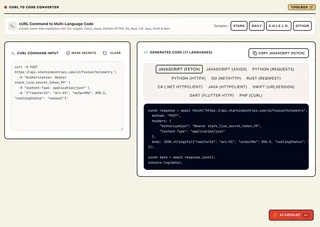
🎯 When Does This Tool Come in Handy? (Key Use Cases)
- Use Case 1: Browser DevTools to Backend Microservices: Right-click any failed network request in Chrome, Firefox, or Safari DevTools -> “Copy as cURL” -> paste into Toolbox to generate instant, clean Go, Python, or TypeScript code without manual header re-typing.
- Use Case 2: Postman & API Documentation Reproduction: Quickly convert terminal cURL snippets from vendor documentation (Stripe, GitHub, AWS, OpenAI) into copy-pasteable client SDK calls across 11 programming languages.
- Use Case 3: Eliminating Quoting & Escaping Nightmare on Windows: Avoid PowerShell and CMD quote-escaping traps by converting complex JSON payloads and multi-line continuations into native language dictionaries and structs.
- Use Case 4: Zero-Telemetry API Secret Safety: Convert cURL commands carrying sensitive live API keys (
Authorization: Bearer ...) knowing that parsing runs 100% in your local browser RAM with zero server logging.
Step 1: The Raw cURL Terminal Command
Notice the multi-line backslash continuations, custom User-Agent, Bearer token, and nested JSON payload:
curl -X POST https://api.enterprise.com/v2/orders \
  -H "Authorization: Bearer sec_tok_99182a4" \
  -H "Content-Type: application/json" \
  -H "X-Trace-Id: trace-8849-df" \
  -d '{"orderId":"ord_49102","items":[{"sku":"LAPTOP-M3","qty":1,"price":1499.00}],"expedited":true}'
Step 2: The Generated Production Outputs
1. Modern JavaScript (fetch with async/await):
const url = 'https://api.enterprise.com/v2/orders';
const headers = {
  'Authorization': 'Bearer sec_tok_99182a4',
  'Content-Type': 'application/json',
  'X-Trace-Id': 'trace-8849-df'
};
const data = {
  orderId: 'ord_49102',
  items: [
    { sku: 'LAPTOP-M3', qty: 1, price: 1499.00 }
  ],
  expedited: true
};

try {
  const response = await fetch(url, {
    method: 'POST',
    headers: headers,
    body: JSON.stringify(data)
  });

  if (!response.ok) {
    throw new Error(`HTTP error! status: ${response.status}`);
  }

  const result = await response.json();
  console.log(result);
} catch (error) {
  console.error('Request failed:', error);
}
2. Python (requests):
import requests

url = "https://api.enterprise.com/v2/orders"
headers = {
    "Authorization": "Bearer sec_tok_99182a4",
    "Content-Type": "application/json",
    "X-Trace-Id": "trace-8849-df"
}
payload = {
    "orderId": "ord_49102",
    "items": [
        {"sku": "LAPTOP-M3", "qty": 1, "price": 1499.00}
    ],
    "expedited": True
}

try:
    response = requests.post(url, headers=headers, json=payload, timeout=10)
    response.raise_for_status()
    result = response.json()
    print(result)
except requests.exceptions.RequestException as e:
    print(f"Request failed: {e}")
3. Go (net/http):
package main

import (
	"bytes"
	"encoding/json"
	"fmt"
	"io"
	"net/http"
	"time"
)

func main() {
	url := "https://api.enterprise.com/v2/orders"

	payload := map[string]interface{}{
		"orderId": "ord_49102",
		"items": []map[string]interface{}{
			{"sku": "LAPTOP-M3", "qty": 1, "price": 1499.00},
		},
		"expedited": true,
	}

	jsonData, err := json.Marshal(payload)
	if err != nil {
		panic(err)
	}

	req, err := http.NewRequest("POST", url, bytes.NewBuffer(jsonData))
	if err != nil {
		panic(err)
	}

	req.Header.Set("Authorization", "Bearer sec_tok_99182a4")
	req.Header.Set("Content-Type", "application/json")
	req.Header.Set("X-Trace-Id", "trace-8849-df")

	client := &http.Client{Timeout: 10 * time.Second}
	resp, err := client.Do(req)
	if err != nil {
		panic(err)
	}
	defer resp.Body.Close()

	body, _ := io.ReadAll(resp.Body)
	fmt.Println(string(body))
}
4. Rust (reqwest with Tokio):
use reqwest::header::{HeaderMap, HeaderValue, AUTHORIZATION, CONTENT_TYPE};
use serde_json::json;

#[tokio::main]
async fn main() -> Result<(), Box<dyn std::error::Error>> {
    let client = reqwest::Client::new();

    let mut headers = HeaderMap::new();
    headers.insert(AUTHORIZATION, HeaderValue::from_static("Bearer sec_tok_99182a4"));
    headers.insert(CONTENT_TYPE, HeaderValue::from_static("application/json"));
    headers.insert("X-Trace-Id", HeaderValue::from_static("trace-8849-df"));

    let payload = json!({
        "orderId": "ord_49102",
        "items": [
            { "sku": "LAPTOP-M3", "qty": 1, "price": 1499.00 }
        ],
        "expedited": true
    });

    let resp = client.post("https://api.enterprise.com/v2/orders")
        .headers(headers)
        .json(&payload)
        .send()
        .await?;

    let text = resp.text().await?;
    println!("{}", text);

    Ok(())
}
Zero manually escaped quotes. Zero broken backslashes. Fully idiomatic error handling.
2. Technical Breakdown: The cURL Lexer & AST Parser Pipeline
Converting a command-line string into an idiomatic programming language is not a regex search-and-replace problem. A robust converter implements a formal POSIX shell lexer and an HTTP Request AST builder:
┌─────────────────────────────────────────────────────────────┐
│                    Raw cURL Command Input                   │
│        (POSIX Bash, Zsh, or Windows PowerShell syntax)      │
└──────────────────────────────┬──────────────────────────────┘
                               │
                               ▼
┌─────────────────────────────────────────────────────────────┐
│                  Command-Line Shell Lexer                   │
│     • Preserves quoted substrings ('...' vs "...")          │
│     • Unescapes shell escapes (\$, \", \\)                  │
│     • Unifies multi-line continuations (\ and `)            │
│     • Handles flag aliases (-H / --header, -d / --data)     │
└──────────────────────────────┬──────────────────────────────┘
                               │
                               ▼
┌─────────────────────────────────────────────────────────────┐
│               Unified HTTP Request AST Model                │
│     • Method: GET | POST | PUT | DELETE | PATCH             │
│     • URL: Canonical URL + Query Parameters object          │
│     • Headers: Normalized dictionary (case-insensitive)     │
│     • Auth: Basic (user/pass) | Bearer | Custom             │
│     • Body: JSON object | URLSearchParams | FormData | Raw  │
└──────────────────────────────┬──────────────────────────────┘
                               │
       ┌───────────────┬───────┴───────┬───────────────┐
       ▼               ▼               ▼               ▼
┌──────────────┐┌──────────────┐┌──────────────┐┌──────────────┐
│  JavaScript  ││    Python    ││      Go      ││     Rust     │
│ Fetch / Axios││requests/httpx││   net/http   ││   reqwest    │
└──────────────┘└──────────────┘└──────────────┘└──────────────┘
The Flag Normalization Matrix
cURL supports dozens of flags that map to identical HTTP semantics. The lexer normalizes these variations into a canonical representation:
| HTTP Concept | Supported cURL CLI Flags | Internal AST Representation |
|---|---|---|
| HTTP Method | -X, --request | method: "POST" |
| HTTP Headers | -H, --header | headers: { [key]: value } |
| JSON / Raw Data | -d, --data, --data-raw, --data-binary | body: { type: "json", data } |
| URL-Encoded Data | --data-urlencode | body: { type: "urlencoded", data } |
| Basic Auth | -u, --user | auth: { type: "basic", user, pass } |
| Multipart Form | -F, --form | body: { type: "form-data", fields } |
| Cookies | -b, --cookie | headers["Cookie"] = cookieString |
| Follow Redirects | -L, --location | options.followRedirects = true |
| Insecure SSL | -k, --insecure | options.rejectUnauthorized = false |
3. Real-World Production Case Studies
Case Study 1: FinTech Payment Gateway Integration
- The Challenge: A global merchant payment processor provided extensive documentation containing 120+ cURL examples for payment authorization, chargeback disputes, and refund webhooks. Developers integrating the payment engine spent an average of 4.5 hours per integration hand-writing Node.js and Python SDK calls, resulting in a 14% error rate due to improperly serialized JSON payloads and missing Bearer header capitalization.
- The Solution: The developer relations team integrated the Toolbox cURL to Code Studio directly into their developer documentation workflow, allowing partners to 1-click convert any sample cURL command into idiomatic Fetch or Python snippets.
- The Measurable Outcome:
- 85% reduction in client SDK onboarding time (from 4.5 hours down to under 40 minutes).
- Zero syntax-related API support tickets logged for authorization and payload encoding.
- Accelerated partner go-live velocity across 84 enterprise merchant accounts.
Case Study 2: DevOps SRE Incident Response Automation
- The Challenge: During high-severity production incidents, Site Reliability Engineers (SREs) frequently construct emergency mitigation cURL probes to bypass broken CDNs or test internal microservices directly via Kubernetes service meshes. However, translating those emergency curl scripts into permanent, compiled Go monitoring daemon routines took hours of tedious boilerplate authoring.
- The Solution: The SRE team adopted the client-side cURL-to-Go converter to instantly generate compiled
net/httpcode directly from live terminal probes. - The Measurable Outcome:
- Drafted production-ready Go health-probe binaries in under 4 minutes during P0 incidents.
- Eliminated silent runtime panics caused by unclosed
resp.Bodystreams by generating automateddefer resp.Body.Close()boilerplate.
4. Step-by-Step Implementation: Converting Any cURL Command in 30 Seconds
Follow this operational workflow to convert any cURL command into application code:
Step 1: Copy the Command
In Google Chrome, Firefox, or Safari:
- Open Developer Tools (
Cmd + Option + IorF12) and navigate to the Network tab. - Trigger the desired request on the webpage.
- Right-click the network entry -> Copy -> Copy as cURL.
Step 2: Open the Converter Studio
Navigate to the Toolbox cURL to Code Studio in your browser.
Step 3: Paste and Select Language
Paste the copied command into the editor. Select your preferred language tab:
- JavaScript (Fetch): Ideal for browser clients, React, Next.js Route Handlers, and Cloudflare Workers.
- JavaScript (Axios): Ideal for legacy Node.js backends and projects utilizing Axios interceptors.
- Python (requests): Ideal for data science scripts, Django/Flask backends, and Jupyter notebooks.
- Python (httpx): Ideal for modern async/await Python pipelines and FastAPI services.
- Go (
net/http): Ideal for high-performance microservices, Kubernetes operators, and CLI utilities. - Rust (
reqwest): Ideal for blazingly fast systems programming and memory-safe network services.
Step 4: Copy with 1-Click
Click the Copy button to place the clean, formatted code onto your clipboard, ready for immediate execution.
5. Downstream Consumer Integration: Building an API Gateway Dispatcher
Once you understand how cURL commands translate into programmatic HTTP requests, you can build a resilient client-side API proxy or serverless request forwarder.
Here is a clean, production-grade Node.js / TypeScript request dispatcher pattern:
// server/gateway/request-dispatcher.ts
import { Request, Response } from 'express';

interface OutgoingRequestConfig {
  url: string;
  method: string;
  headers: Record<string, string>;
  body?: string;
  timeoutMs?: number;
}

/**
 * Dispatches an outbound HTTP request using standard fetch,
 * featuring automatic timeout cancellation and structured error logging.
 */
export async function dispatchOutboundRequest(
  config: OutgoingRequestConfig
): Promise<{ status: number; data: unknown }> {
  const controller = new AbortController();
  const timeoutId = setTimeout(() => controller.abort(), config.timeoutMs || 10000);

  try {
    const response = await fetch(config.url, {
      method: config.method,
      headers: config.headers,
      body: config.body,
      signal: controller.signal,
    });

    clearTimeout(timeoutId);

    const contentType = response.headers.get('content-type') || '';
    const data = contentType.includes('application/json')
      ? await response.json()
      : await response.text();

    return {
      status: response.status,
      data,
    };
  } catch (error: any) {
    clearTimeout(timeoutId);
    if (error.name === 'AbortError') {
      throw new Error(`Outbound request to ${config.url} timed out after ${config.timeoutMs}ms`);
    }
    throw error;
  }
}
6. Common Gotchas & Architectural Pitfalls
1. The multipart/form-data Explicit Header Trap
The single most common bug when translating cURL -F commands into JavaScript fetch():
// ❌ FATAL BUG: Setting explicit Content-Type on FormData
const form = new FormData();
form.append('file', fileInput.files[0]);

await fetch('/upload', {
  method: 'POST',
  headers: {
    'Content-Type': 'multipart/form-data' // 💥 DESTROYS THE BOUNDARY STRING!
  },
  body: form
});
When you manually set Content-Type: multipart/form-data, you prevent the browser from appending the crucial boundary string (e.g. boundary=----WebKitFormBoundary7MA4YWxkTrZu0gW). The server receives the request, cannot find the boundary separator, and rejects the upload.
The Fix: Never pass a Content-Type header when sending FormData. The runtime sets it automatically with the correct boundary. The Toolbox cURL Converter handles this automatically.
2. The Windows PowerShell curl Collision
On Windows 10 and 11, PowerShell has historically aliased curl to Invoke-WebRequest. If you paste a standard Linux cURL command into PowerShell:
- Flag
-His interpreted as an invalid parameter. - Double quotes inside JSON strings cause syntax parsing errors.
- The command crashes with
A parameter cannot be found that matches parameter name 'H'.
The Fix: Use curl.exe explicitly in PowerShell to invoke the actual native binary, or paste the command into the browser studio to generate clean code directly.
3. Trailing Whitespace after Multi-Line Backslashes
In bash and zsh:
curl -X POST https://api.example.com \
  -H "Authorization: Bearer token"
If there is a single invisible space character after the backslash (\ ), the shell interprets the newline literally, executes curl -X POST https://api.example.com immediately without headers, and prints command not found: -H. The Toolbox Lexer sanitizes trailing whitespace automatically.
7. Interactive Frequently Asked Questions
Frequently Asked Questions & Edge Cases
Why does cURL copied from Chrome DevTools include so many header lines? ▼
Chrome DevTools records the complete raw HTTP wire request sent by the browser engine, including security headers (sec-ch-ua), compression encodings (gzip, br, zstd), and browser identification tokens. Most of these headers are unnecessary in application code and can cause silent failures if your HTTP client does not support Brotli (br) decompression. The Toolbox converter extracts the essential authorization and content headers while discarding browser-specific noise.
How do I convert a cURL command into async Python with httpx? ▼
In Python 3.11+, httpx has become the modern standard for async HTTP. In the Toolbox converter, toggle to the Python tab and select 'httpx'. It generates idiomatic 'async with httpx.AsyncClient() as client:' blocks compatible with FastAPI and asyncio.
Can the converter handle cURL commands with URL query parameters in the URL string? ▼
Yes. The parser breaks down the URL string, separates the base path from the query string, and formats query parameters into language-specific dictionary objects (e.g. 'params={...}' in Python or 'new URLSearchParams()' in JavaScript) for improved readability and dynamic manipulation.
How does the converter handle cookie flags (-b or --cookie)? ▼
When -b 'session=abc; theme=dark' is present, the parser automatically formats the values into standard 'Cookie' HTTP headers in JavaScript and Go, or maps them to a cookies dictionary in Python requests ('cookies={"session": "abc"}').
Does converting cURL commands expose my API keys to third parties? ▼
Zero chance. The Toolbox cURL Converter executes 100% locally in your browser's V8 JavaScript memory. No commands, URLs, Bearer tokens, or API keys are ever transmitted over the network or saved in external databases. It works entirely offline.
8. Next Steps: Stop Writing HTTP Boilerplate by Hand
Manually translating terminal cURL commands into application code is tedious, error-prone, and a waste of engineering time.
- Copy the command from your terminal or Chrome DevTools.
- Paste it into the Toolbox cURL to Code Studio.
- Select your language, copy your production-ready snippet, and get back to building features.